Dr. Fire Transparent Control
Jesse Seidel (Dr. Fire)
(22 Submissions)
Custom Controls/Forms/Menus
Visual Basic 5.0
Beginner
Wed 3rd February 2021
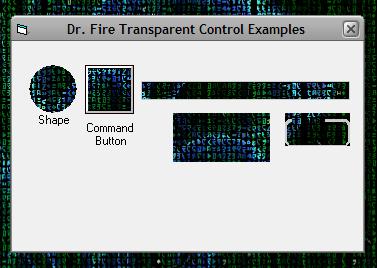
With this control, all you need to do is drop it on your form, and then ANYTHING on your form that is pruple will become transparent. This would be a useful tool for created custom shaped forms. On the example form provided, I have set a command button, label, frame control, text box, and shape control to purple, so they become transparent, incase you somehow got confused on how to use this.
Rate Dr. Fire Transparent Control
 (12(12 Vote))
(12(12 Vote))
Download Dr. Fire Transparent Control
Active Server Pages
Coding Standards
Complete Applications
Custom Controls
Data Structures
Databases / ADO
DDE
Debugging & Errors
DirectX
Encryption
Files / I/O
Games
Graphics
Internet / HTML
Jokes / Humor
Libraries
Math / Dates
Office / VBA
Miscellaneous
OOP
OLE / COM / ActiveX
Registry
Sound / MP3
String Manipulation
VB Enhancements
Windows API
Windows CE
System Services