Display Current Mouse Pointer Image
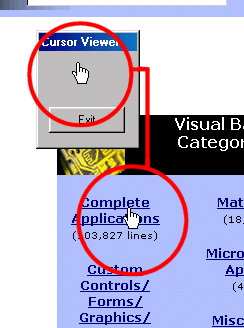
This code displays a picture of the current mouse pointer in a PictureBox control. This could be useful for doing screen captures that include the mouse pointer.
Assumes
Create a Form (frmMain), a PictureBox (picCursor), a Timer (tmrCursor), and a Command Button (cmdExit). Set tmrCursor's interval to 10.
Side Effects
It seems to prevent double-clicking.
API Declarations' Get the handle of the window the mouse is over
Private Declare Function WindowFromPoint Lib "user32" (ByVal xPoint As Long, ByVal yPoint As Long) As Long
' Retrieves the handle of the current cursor
Private Declare Function GetCursor Lib "user32" () As Long
' Gets the coordinates of the mouse pointer
Private Declare Function GetCursorPos Lib "user32" (lpPoint As POINTAPI) As Long
' Gets the PID of the window specified
Private Declare Function GetWindowThreadProcessId Lib "user32" (ByVal hWnd As Long, lpdwProcessId As Long) As Long
' Gets the PID of the current program
Private Declare Function GetCurrentThreadId Lib "kernel32" () As Long
' This attaches our program to whichever thread "owns" the cursor at the moment
Private Declare Function AttachThreadInput Lib "user32" (ByVal idAttach As Long, ByVal idAttachTo As Long, ByVal fAttach As Long) As Long
' The next function draws the cursor to picCursor
' Note: If you want to display it in an Image control, use the GetDc API call
Private Declare Function DrawIcon Lib "user32" (ByVal hdc As Long, ByVal x As Long, ByVal y As Long, ByVal hIcon As Long) As Long
' The POINTAPI type hold the (X,Y) for GetCursorPos()
Private Type POINTAPI
x As Long
y As Long
End Type
' The following are used for keeping the window always on top. This is optional.
Private Declare Function SetWindowPos Lib "user32" (ByVal hWnd As Long, ByVal hWndInsertAfter As Long, ByVal x As Long, ByVal y As Long, ByVal cx As Long, ByVal cy As Long, ByVal wFlags As Long) As Long
Private Const SWP_TOPMOST = -1
Private Const SWP_NOTOPMOST = -2
 (5(5 Vote))