Display Checkboxes in Listbox Horizontally
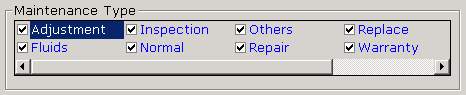
Display Checkboxes in Listbox Horizontally
I've been searching the internet and VBC on how to display checkboxes in a listbox in a horizontal manner but I didn't found any. Perhaps my search keywords are wrong but really I found nothing.
I decided to re-examine the listbox property if I can find something that I have overlooked before and there it is. Who would have thought that by merely CHANGING THE COLUMNS PROPERTY TO ANY NUMBER OTHER THAN 0 WOULD ACCOMPLISH WHAT I WANTED TO DO.
Many of you may have already known this but for newbies out there, this might help. See the screenshot to see what I mean.
For the screenshot below, the setting is:
Listbox1.columns = 4
OR
In the properties list, change Columns = 0 to Columns = any number you want.
The number of columns specified will configure the listbox to show 4 columns in its display window. A horizontal scrollbar will be displayed if the data display occupies more than 4 columns.
 (8(8 Vote))