Desktop magnifier and Screen color picker (More additions 16 Apr)
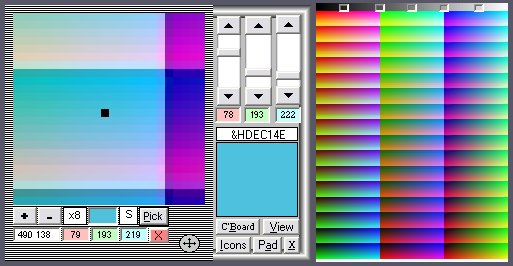
Desktop Magnifier & Screen Color Picker by Robert Rayment: (Update7 16 Apr))(Added simple RGB color maker, saving Hex color to Clipboard and selectable from a button on the magnifier). Always on top, x2, x4,,,x32 magnification, RGB to Clipboard, exact location of cursor shown on magnifier with a black dot. Magnifier can be moved to any part of the screen. Keys: S to save RGB to clipboard. Incorporated code by LaVolpe to see layered windows!
__________________________________________________
Update: Moved all controls onto picture box & made the form same size as picture box. Accomodate the 120 dpi as well as the normal 96 dpi.
__________________________________________________
Update2: All on one Form. With Color Maker, added click on screen to set Scrollbars. Mag +- button 2,4,8,16,32. Move one pixel with arrow keys. Esc also to Exit. Toggle Color Maker. Added Matthew's border UC(CodeId 64572).
__________________________________________________
Update3: All suggestions included, in particular black dot can be toggled black/white so visible on any background. Zip 19 KB.
__________________________________________________
Update4: Simplified. Tidy up exitting. Zip 11 KB.
__________________________________________________
Update5: Added Hide Icons from Augustin Rodriguez's 'Virtual Aquarium' CodeId=64997).
__________________________________________________
Update6: Adjusted RGB picker for 120 DPI. Anyone know a general routine for this?
__________________________________________________
Update7: Added Color pad (5 x 47773 colors) & Clipboard View. Zip 21 KB.
Assumes
Just Run
Returns
RGB
API DeclarationsA few, see code
 (13(13 Vote))