Demo: Popup Window (like menu or drop-down windows) (No hooks)
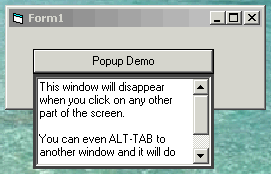
One of the most common types of a focus-only popup window is the menu. A drop-down list is another example. Both disappear when they lose focus.
Here's a demonstration of how to do that. It doesn't rely on the LostFocus event, which only works within that form's scope. Switch to a different application and your popup would still be visible. Instead, it uses a timer and an API call to check to see if the popup still has global focus. If not, it self-unloads.
While it does act essentially like menu-style popup windows, it's not exactly the same. To do that, I think it's necessary to use an API call to hook into some Windows event that detects a change in overall focus. This technique relies on constantly polling the OS. It also means the form that uses the popup will technically lose focus (big deal). It's generally a little klunky. Still, it works very well.
Thanks go out to MrGTI (www.Pharfruminsain.com) for advice on the basic technique. I encourage anyone who knows the "right" way of doing this to let me know.
Please vote for this code if you like it.
 (5(5 Vote))