Custom VB6 Treeview control
Panos Koutsoukeras
(1 Submission)
Custom Controls/Forms/Menus
Visual Basic 3.0
Advanced
Wed 3rd February 2021
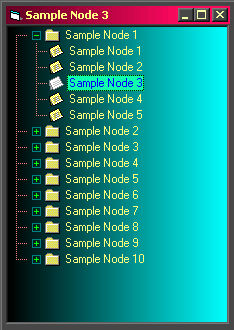
A UserControl made with a VB6 Treeview control (MSCOMCTL.OCX - 6.00.8862)
with customized Background (Color, GradientRectHor, GradientRectHor
GradientTri, tiled Picture), Backcolor, Forecolor, Buttons, Tooltips etc.
Side Effects
The UserControl does not repaint correctly if the ClipControls property of the Form1 has been set to False
Some of the Background options behave strangely, because of the Treeview control, but this is only a demo, showing some ways to draw on a VB6 Treeview background.
If Background = fvGrdntRectVer or fvGrdntTri or fvPicturedTiled (m_BackScroll = True) then the control
does not show Tooltips and Scrolls one at a time
Rate Custom VB6 Treeview control
 (16(16 Vote))
(16(16 Vote))
Download Custom VB6 Treeview control
Active Server Pages
Coding Standards
Complete Applications
Custom Controls
Data Structures
Databases / ADO
DDE
Debugging & Errors
DirectX
Encryption
Files / I/O
Games
Graphics
Internet / HTML
Jokes / Humor
Libraries
Math / Dates
Office / VBA
Miscellaneous
OOP
OLE / COM / ActiveX
Registry
Sound / MP3
String Manipulation
VB Enhancements
Windows API
Windows CE
System Services