Custom Gauge OCX (minor modification)
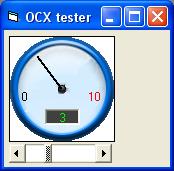
This simple code makes a custom OCX gauge.
Use the min, max, and value properties to customize your gauge.
The supplied tester project demonstrates how you may use the OCX.
You may use this code as a simple reference on how to use "property let"
and "property get" to give properties to your OCX.
Inputs
min, max, and value properties (like the scroll bar control)
Assumes
There is a tester project supplied with the ocx project. Use the file Group1.vbg to run the ocx project and the tester project.
Returns
min, max, and value properties(like the scroll bar control)
Rate Custom Gauge OCX (minor modification)
 (4(4 Vote))
(4(4 Vote))
Download Custom Gauge OCX (minor modification)
Active Server Pages
Coding Standards
Complete Applications
Custom Controls
Data Structures
Databases / ADO
DDE
Debugging & Errors
DirectX
Encryption
Files / I/O
Games
Graphics
Internet / HTML
Jokes / Humor
Libraries
Math / Dates
Office / VBA
Miscellaneous
OOP
OLE / COM / ActiveX
Registry
Sound / MP3
String Manipulation
VB Enhancements
Windows API
Windows CE
System Services