CustFont
Rob Bogdanoff
(1 Submission)
Custom Controls/Forms/Menus
Visual Basic 3.0
Beginner
Wed 3rd February 2021
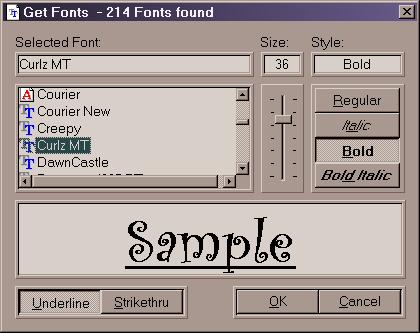
Here is a simple custom font dialog. Using the API
EnumFontFamily, it finds all TrueType and Fixed width
fonts. The font names are displayed, w/icon, in a listview.
A slider control allows continuous scrolling of font size.
A sample of the font at the selected size and style is displayed.
A DrawFameOn routine is included which is used to frame
all the controls (see screen shot).
Assumes
Written in VB6 and requires ListView, ImageList, and
Slider controls.
Returns
FontName
FontSize
FontStyle
Underline effect
StrikeThru effect
Rate CustFont
 (6(6 Vote))
(6(6 Vote))
Download CustFont
Active Server Pages
Coding Standards
Complete Applications
Custom Controls
Data Structures
Databases / ADO
DDE
Debugging & Errors
DirectX
Encryption
Files / I/O
Games
Graphics
Internet / HTML
Jokes / Humor
Libraries
Math / Dates
Office / VBA
Miscellaneous
OOP
OLE / COM / ActiveX
Registry
Sound / MP3
String Manipulation
VB Enhancements
Windows API
Windows CE
System Services