Code Commentor Add-in
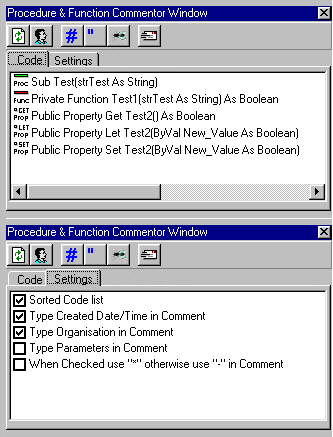
Comment any line of code in your project
Assumes
This Add-in is written in VB6 and sp4.
You have to manualy register the add-in dll.
First copy the RBVBCommentor.dll to the \WINDOWS\SYSTEM32 or \WINNT\SYSTEM32 directory.
In the SYSTEM32 directory type REGSVR32 RBVBCommentor.dll.
If the registration is succeeded, start Visual Basic and activate the add-in.
In some cases the add-in is not shown in the add-in manager.
To make it visible, go to the \WINDOWS or \WINNT directory and edit the VBADDIN.INI.
Add the following key; RBVBCommentor.Connector=0.
Restart Visual Basic and activate the Add-in.
Rate Code Commentor Add-in
 (5(5 Vote))
(5(5 Vote))
Download Code Commentor Add-in
Active Server Pages
Coding Standards
Complete Applications
Custom Controls
Data Structures
Databases / ADO
DDE
Debugging & Errors
DirectX
Encryption
Files / I/O
Games
Graphics
Internet / HTML
Jokes / Humor
Libraries
Math / Dates
Office / VBA
Miscellaneous
OOP
OLE / COM / ActiveX
Registry
Sound / MP3
String Manipulation
VB Enhancements
Windows API
Windows CE
System Services