VBcoders Guest


Don't have an account yet? Register


Forgot Password?


Change Default Project Location
by TonyK (3 Submissions)
Category: Miscellaneous
Compatability: Visual Basic 3.0
Difficulty: Beginner
Date Added: Wed 3rd February 2021
Rating: (9 Votes)

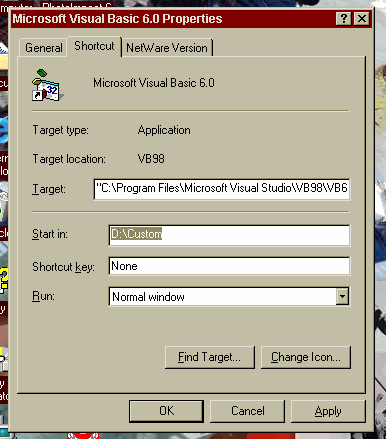
Have VB installed in default location of C:\Program Files........ and have the "Save As" and "Existing Files" dialogs default to a customized location.

Rate Change Default Project Location

I had submitted this question to the "Ask a Pro" section here as well as to the VB section of "AskMe.com" with no success so I contacted Microsoft who provided this all to simple solution. 
I have installed VB into the default location but I keep all of my projects on a seperate drive. I was tired of having to change locations everytime I saved a project or opened a project. Any way here is the solution in case any of you are interested and do not already know.
Simply chage the "Start In" location of the shortcut to VB to the drive and/or folder that contains your projects. See the screen shot.

Download this snippet    Add to My Saved Code

Change Default Project Location Comments

No comments have been posted about Change Default Project Location. Why not be the first to post a comment about Change Default Project Location.

Post your comment

Subject:
Message:
0/1000 characters