CaptionButton Control
Gerco Dries
(4 Submissions)
Custom Controls/Forms/Menus
Visual Basic 5.0
Advanced
Wed 3rd February 2021
Have you ever wanted to display an extra button or two next to the minimize, maximize and close buttons? Now you can!
Just download this easy to use ActiveX control and you're done. Compile it (it's safer that way in the IDE) and just add some to your form.
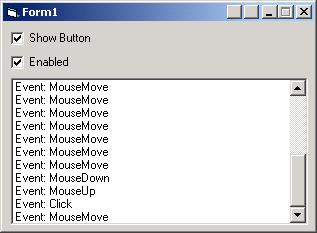
The only thing you'll need to do manually is position the buttons on your window's caption bar (only if you have more than one), set a picture to use on it and you'll receive nice MouseMove, MouseUp, MouseDown and Click events from it, just like a normal button.
A test project is included, see the screenshot.
Rate CaptionButton Control
 (16(16 Vote))
(16(16 Vote))
Download CaptionButton Control
Active Server Pages
Coding Standards
Complete Applications
Custom Controls
Data Structures
Databases / ADO
DDE
Debugging & Errors
DirectX
Encryption
Files / I/O
Games
Graphics
Internet / HTML
Jokes / Humor
Libraries
Math / Dates
Office / VBA
Miscellaneous
OOP
OLE / COM / ActiveX
Registry
Sound / MP3
String Manipulation
VB Enhancements
Windows API
Windows CE
System Services