Auto RegEx Tool
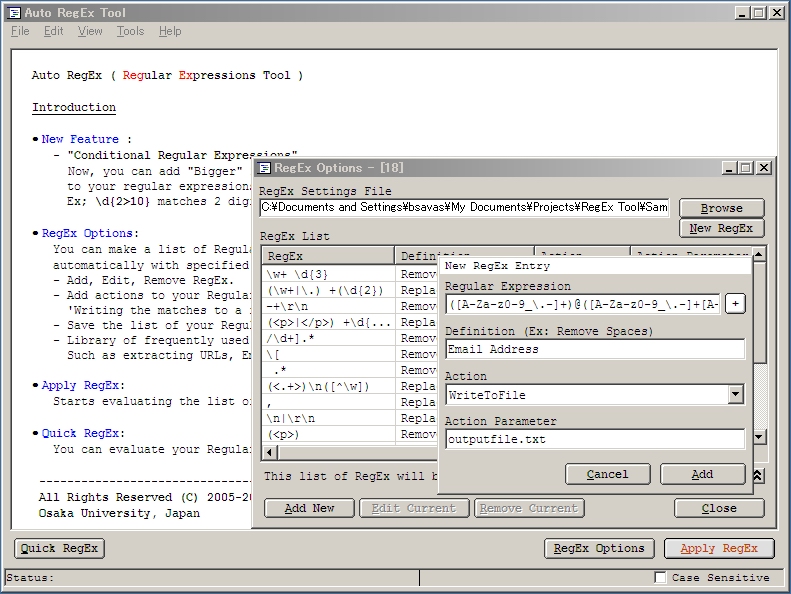
You can make a list of Regular Expressions and apply them one by one automatically with specified actions easily with this tools.
Actually, I developed this tool for formating Annotated Corpus text files.
Some features;
• New Feature :
- "Conditional Regular Expressions"
Now, you can add "Bigger" > or "Smaller" < conditional operator
to your regular expressions for numbers.
Ex; \d{2>10} matches 2 digit numbers bigger than 10.
• RegEx Options:
You can make a list of Regular Expressions and apply them one by one
automatically with specified actions easily.
- Add, Edit, Remove RegEx.
- Add actions to your Regular Expressions like 'Replacing', 'Highlighting',
'Writing the matches to a file', 'Removing'.
- Save the list of your Regular Expressions for later use.
- Library of frequently used Regular Expressions ready to use.
Such as extracting URLs, Emails etc...
• Apply RegEx:
Starts evaluating the list of Regular Expressions you've added one by one.
• Quick RegEx:
You can evaluate your Regular Expressions quickly with this function.
Inputs
Plain Text
Assumes
Requirements:
- Microsoft VBScript Regular Expressions 5.5 (vbscript.dll) installed.
Returns
Plain Text/File with actions listed done.
Side Effects
-
API Declarations-
 (4(4 Vote))