Allocate space in the taskbar for a form/control
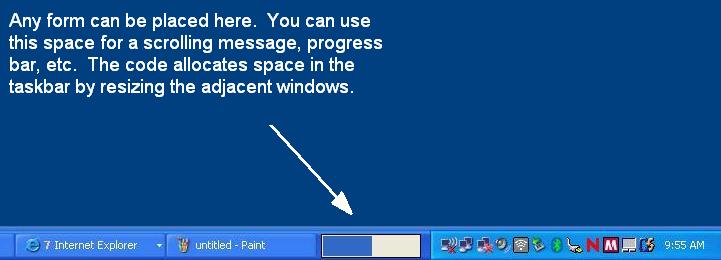
Check out the screenshot... A while back, I purchased an IBM laptop whose battery meter took up space in the task bar between the task switcher and notify icon area. I recently had a need for recreate this functionality and thought I would share the solution. I've seen other code on VBC that "mimics" this but they don't actually allocate space in the Shell_TrayWnd window for a new form. This one does! The code uses all API...
Inputs
All of the logic is contained in a single function called AttachForm. Pass this function the form and and sizing parameters. You can call the DetachForm function if you want to remove the form during run-time.
Assumes
The concept is actually quite simple....
1 - Find the window handles of the task bar (Shell_TrayWnd), task switcher (ReBar_Window32) notify icon area (TrayNotifyWnd), etc.
2 - Set the parent of our form to be the taskbar
3 - Resize the task switcher and notify areas to accompdate our form/control.
4 - Timer checks to see if and taskbar windows have been resized (notify icons added, task bar moved, etc). I haven't found any message hook yet so I had to use a timer.
 (18(18 Vote))