Add Error Handling
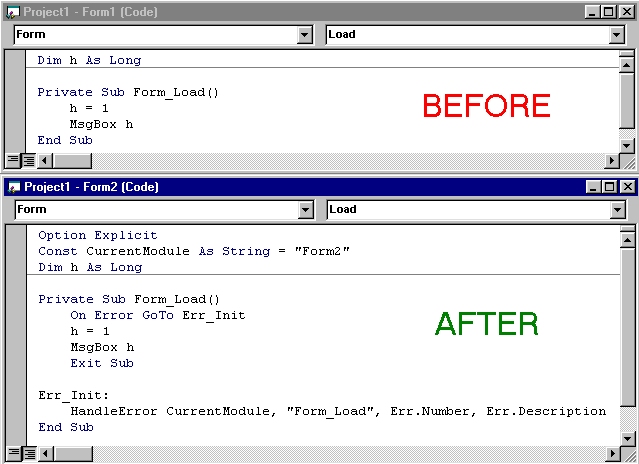
This is the complete code for a VB IDE addin that will add error handling to your procedure. Requires that you have a routine called "HandleError" in a public module accessible to all routines. Sample HandleError routine follows:
Public Sub HandleError(ByVal CurrentModule As String, ByVal CurrentProcedure As String, _
 ByVal ErrNum As Long, ByVal ErrDescription As String)
 On Error GoTo Err_Init
 MsgBox CurrentModule & " " & CurrentProcedure & ": " & ErrNum & " - " & ErrDescription
 Exit Sub
Err_Init:
 MsgBox CurrentModule & " HandleError: " & Err.Number & " - " & Err.Description
End Sub
The best VB code handles errors in every routine - this makes the program very robust. However, there's no easy way to determine WHICH routine failed once you're inside of your global error handler 'HandleError'. Therefore, you must pass the routine name to the global error. This can be very tedious! :-O
This addin adds an 'On Error Goto Err_Init' to the beginning of the routine, and an 'exit function', 'exit sub', or 'exit property' statement plus the error handling code at the bottom. To add error handling to a routine, place the cursor anywhere in the routine code, and choose 'Add Error Handling' from the 'Add-Ins' menu.
The code this routine adds, looks like this:
 Exit (sub, function, or property here)
Err_Init:
 HandleError CurrentModule, "(your routine name here)", Err.Number, Err.Description
Note that it will automatically determine which sort of 'exit' statement is necessary, and what the name of the current procedure is, and pass the procedure name to the error handler.
Rate Add Error Handling
 (31(31 Vote))
(31(31 Vote))
Active Server Pages
Coding Standards
Complete Applications
Custom Controls
Data Structures
Databases / ADO
DDE
Debugging & Errors
DirectX
Encryption
Files / I/O
Games
Graphics
Internet / HTML
Jokes / Humor
Libraries
Math / Dates
Office / VBA
Miscellaneous
OOP
OLE / COM / ActiveX
Registry
Sound / MP3
String Manipulation
VB Enhancements
Windows API
Windows CE
System Services